Independent audit · Designing for AI · Aside
Aside’s agent did the job. The friction sits around it.
An unsolicited audit of an AI browser’s first run, first task, and upgrade path. It includes 22 findings with evidence and fixes, a measured setup timeline, and five concept screens.
Unsolicited audit, October 2026. I have no relationship with Aside. The company didn’t commission or endorse this audit, and every concept screen is my proposal, not Aside’s current UI.
Summary
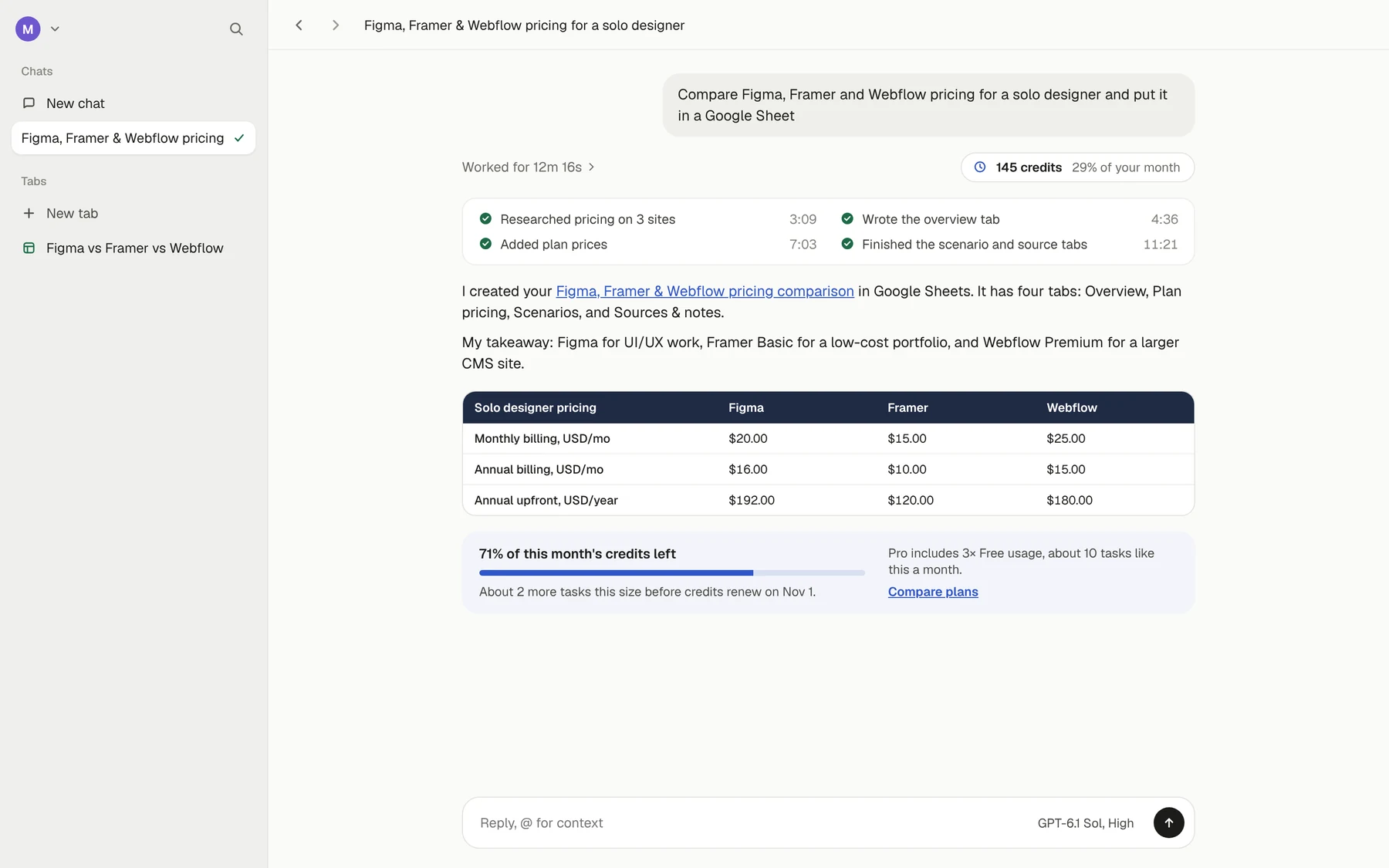
Aside is an AI browser whose agent carries out tasks across websites. I screen-recorded setup, narrating as I went, then gave the agent one real job in one sentence, to compare Figma, Framer and Webflow pricing in a Google Sheet. Twelve minutes later I had a cited, four-tab Sheet in my own Google account.
The friction sits around the agent, not in it.
Setup makes nine asks before any work. Mid-task, I had to sign in to Google and report back. The run used 29% of the month’s free credits, and the result never said so. And where friction belongs, a default takes it away. When I asked the agent to email my own address, it sent the email without asking first.
Quick win 1
Make the Chrome import recoverable
The error appears only after Import, with no reason and no Skip, and cost my run 69 seconds. Check first, name the cause, and wait instead of failing.
Quick win 2
Show what a task costs
One task used 29% of the free month, and the result never said so. Show the cost on the result, not a live meter, and price Pro in tasks.
Strategic
Ask for trust when it pays off
All nine asks come before the first task, and six concern secrets or money. Start with one real task, then let the work trigger each ask.
My role & method
One reviewer,
five recordings.
This was self-initiated, with no brief and no access beyond a free account. Over three Windows sessions on October 6–7, 2026, I narrated five screen recordings. Each finding lists its evidence, and most cite a timestamp in one of those recordings.
- Recordings: setup (6:12), one agent task end to end (23:17), a usage check (2:52), a Help Center lookup (0:52), and a permissions test (5:44)
- Scope: the first run, one core flow, and one conversion surface
- Severity: High risks the first session or user trust, Medium costs time or clarity, and Low is polish
- Deliverables: a 24-page report, 22 findings, five annotated concept screens
Timings come from one run, not averages, and the narration quoted here is my own. A solo audit can show where friction sits, not how often it happens.
First run: 7 findings, 3 High, 2 Medium, 2 Low. Core flow: 7 findings, 1 High, 5 Medium, 1 Low. Conversion surface: 8 findings, 1 High, 5 Medium, 2 Low.
Setup, timed
Where setup’s four minutes went.
I timed every step from the import screen to the browser, 4:11 in all. Two steps, the Chrome-close loop and vault setup, took 2:20 of it, or 56%. Every other step took 25 seconds or less.
- Pick browser and profile0:00–0:2424 seconds
- Chrome-close loop0:24–1:3369 seconds
- Import runs, “No more integrations”1:33–1:4916 seconds
- Sign-in choice + extension pop-ups1:49–2:1223 seconds
- Vault: password, key, import2:12–3:2371 seconds
- AI subscription + plan3:23–3:4623 seconds
- “You’re all set” checklist3:46–4:1125 seconds
Both setup recommendations aim here. Quick win 1 removes the loop, and the strategic reorder moves the vault to the moment it pays off.
Recommendations
Two quick wins and one strategic bet.
Make the Chrome import recoverable
The import fails only after you commit to it, and the error gives no reason and no Skip. In my run, Chrome took about 50 seconds to exit after its windows closed, and nothing said so. The loop cost 69 seconds, at least three failed retries, and a trip to Task Manager.
“Oh, Chrome is still open? I thought I just closed it.”
My narration, setup recording 0:59
What to change
- Check before Import. Detect a running Chrome on the profile screen, before the click.
- Name the cause. “Chrome is still closing in the background,” and why Aside needs it closed.
- Wait instead of failing. Continue on its own when Chrome exits, so nobody has to retry.
- Offer to do it. A “Close Chrome for me” button that warns about unsaved work first.
- Always leave a way out. A “Skip for now” button, pointing to the import that already lives in Settings.
- Warn one step earlier. Add “Quit Chrome first” to the Windows install instructions.
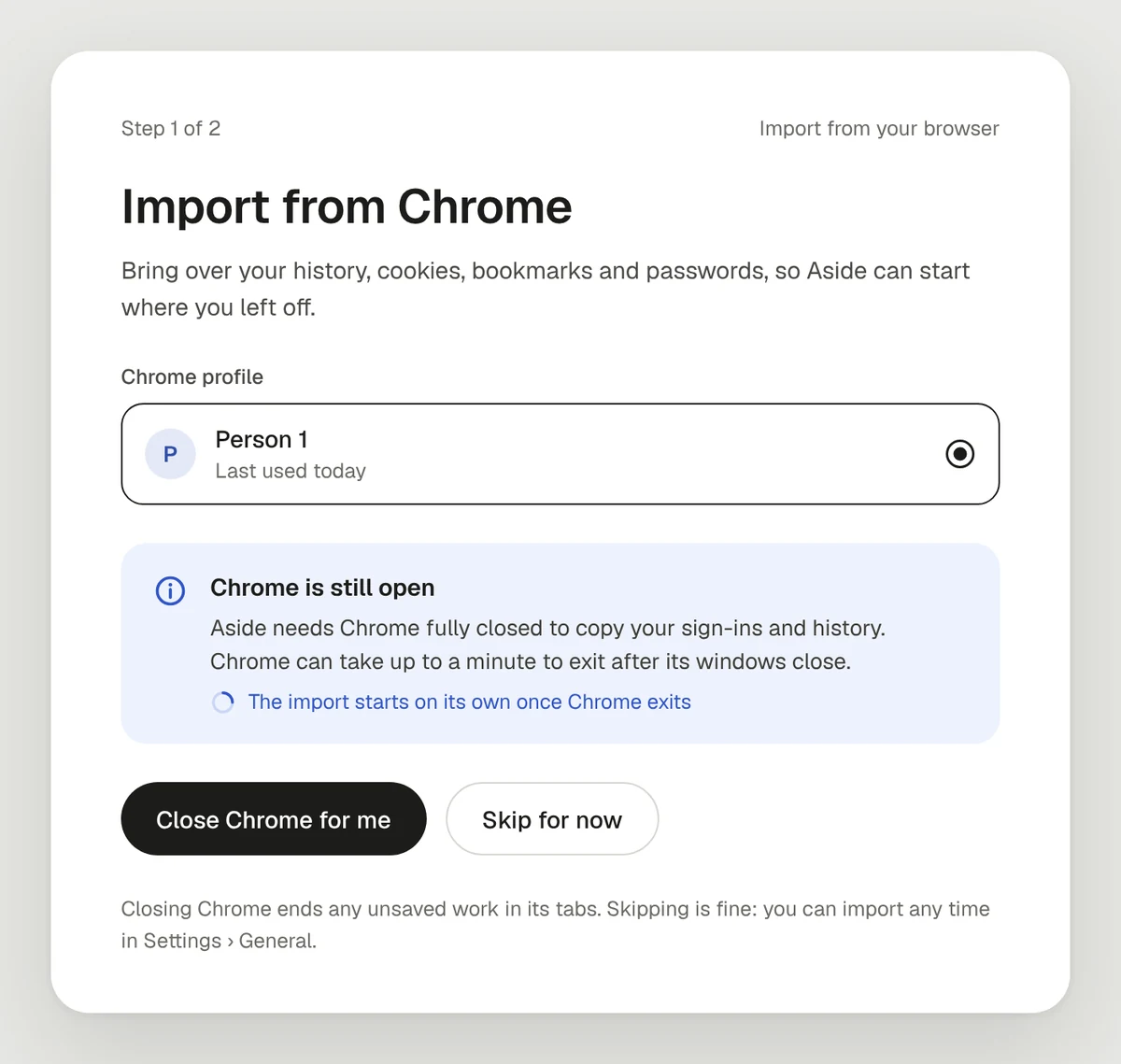
Closing someone’s browser can cost them unsaved work, and a “Leave site?” dialog held Chrome open in my run. So the warning sits right under the button, and Skip is always one click away. The expected effect is that the riskiest moment in setup becomes a short wait that resolves itself.
Show what a task costs
My one 12-minute task used about 145 of the month’s 500 free credits, or 29%. The finished task said how long it worked, not what it cost, and the Usage page named the task on each of dozens of rows without ever totaling them. At that rate, the free plan covers about three tasks like mine a month.
What to change
- Put the cost on the result. Under “Worked for 12m 16s,” a line like “Used about 145 credits · 29% of your month.” That’s the concept at the top of this page.
- Group usage by task. One row per task with its total, expandable to its steps.
- Make it the upgrade moment. When a task takes a large share of the month, offer Pro right there, priced in tasks rather than credits.
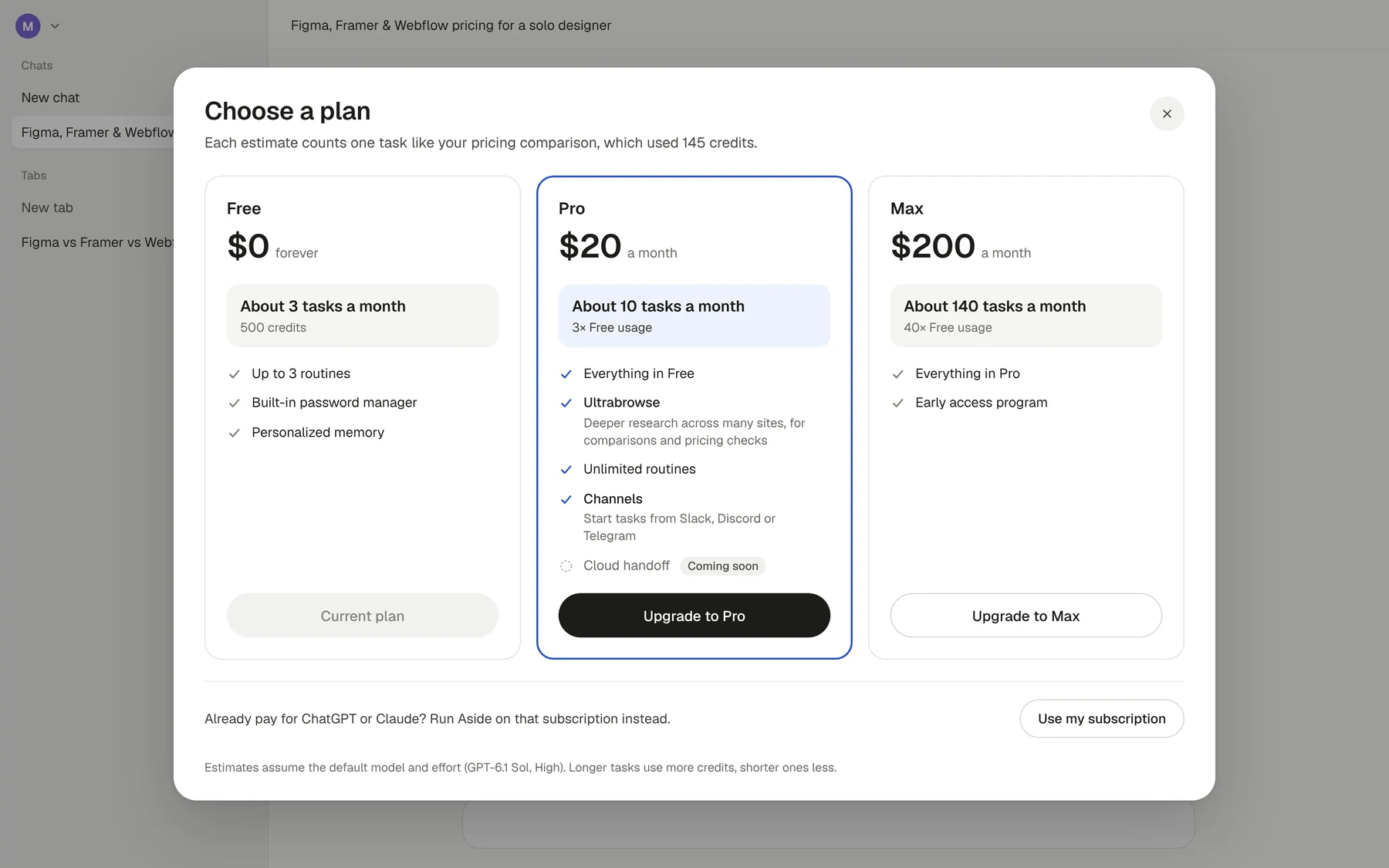
A cost that ticks up during the run works like a taxi meter, and people tend to use less while they watch it. Showing it once, on the result, keeps the information without that pressure.
Ask for trust when it pays off
Setup makes nine asks before the agent does anything, and six concern secrets or money, from an unlock password and a 12-word recovery key to a plan. Each ask lands better at the moment it buys something, like the vault at the first login wall and the plan at the first limit.
Today, in my run
Nine asks before the first task
- Import from Chrome
- Close Chrome: a 69-second loop
- Choose how Aside signs in, an ask about secrets or money
- Create an unlock password, an ask about secrets or money
- Save a 12-word recovery key, an ask about secrets or money
- Import from a password manager, an ask about secrets or money
- Choose an AI subscription, an ask about secrets or money
- Choose a plan, an ask about secrets or money
- Pin, default browser, usage sharing
- First task
- Mid-task: save the Google login, an ask about secrets or money
Proposed
One ask before the first task
- Import from Chrome, with Aside closing Chrome
- First task: a real task on your own sites
- Login wall → save it to the vault, an ask about secrets or money
- Login saved → back up the key, an ask about secrets or money
- Credits run low → choose a plan, an ask about secrets or money
- Pro feature → upgrade in place, an ask about secrets or money
- Later: pin and default browser
The case for the reorder
- The import already holds the best fuel. History, cookies and bookmarks arrive in the first two minutes, and Aside’s homepage says that history becomes memory.
- Start with one real task. Right after import, open Ask mode with a task on a site the user already visits. Suggest tasks that work on public pages, so the first one doesn’t need an inbox or other private data.
- Let the work trigger each ask. Aside already does this once, when the vault offered to save my Google login at the first sign-in. Extend it to plans, and offer Pro when a task takes a large share of the month.
Mid-run, I wondered aloud what this did that a chat assistant couldn’t. The Sheet in my own Google account answered that, which is the argument for putting a real task first.
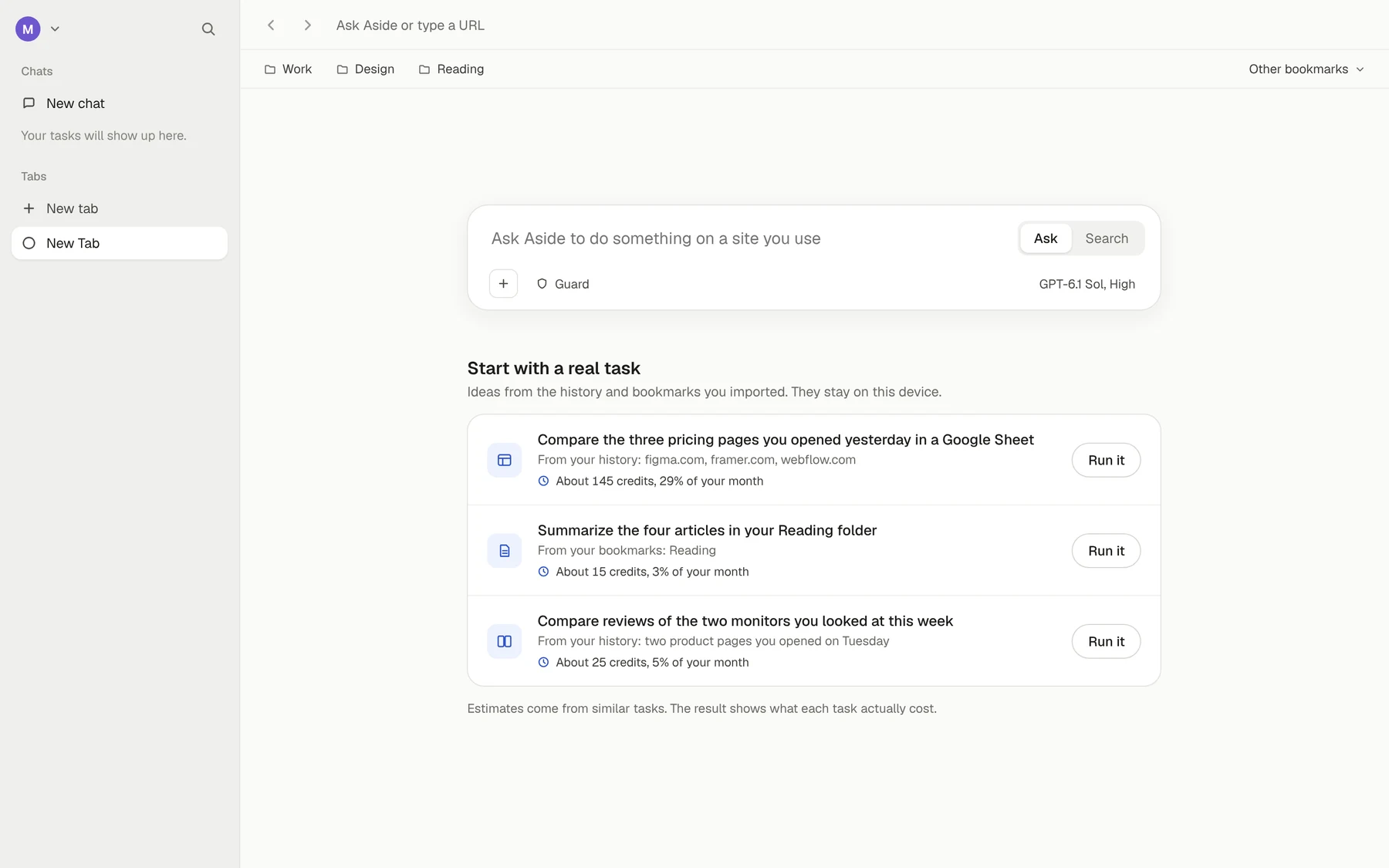
Moving the asks later means fewer people see them. Someone who never hits a login wall never sets up the vault, and fewer people switch their default browser in week one. The bet is that an ask with a reason converts better per view.
To find out, I’d measure time to first task, first-session task completion, vault saves at the first login wall, and upgrades from the result card.
Also in the report
Less friction in setup, more where it counts.
Most of the audit takes friction out. One finding puts some back.
1 Confirm before the agent acts for you
Aside’s homepage describes confirmation for sensitive actions, but Final confirm is off by default. On the defaults, I asked the agent to email my own address. It wrote “I’m sending this now as requested” and sent it, with no prompt. With Final confirm on, the same request stopped at a card showing the full email, with Cancel and Confirm. From the outside, the fix looks like one default, turning Final confirm on for send, pay, delete and submit. The approval card already exists.
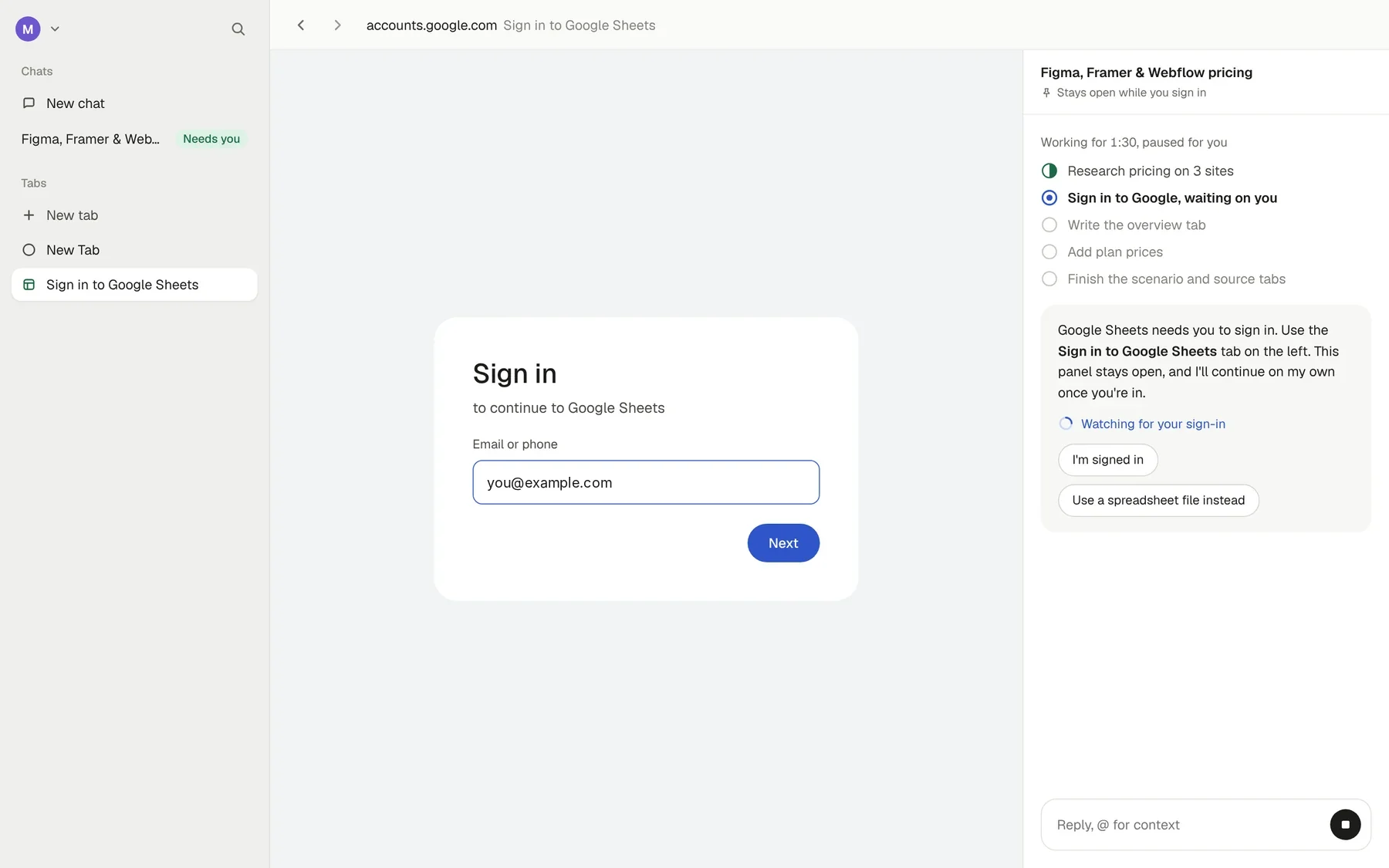
2 Keep the task in view through a sign-in
Despite the cookie import, Google Sheets was signed out. The agent asked me to sign in “in the open Sheets tab,” a tab the sidebar listed under a different name. Its question docked beside Google’s page, then vanished when the page moved on, and I answered 1:23 after it asked. The concept keeps the task docked through every step, names the tab the way the sidebar does, and resumes on its own once the session is live.
3 Name what’s working
The report closes with twelve patterns worth keeping as the flow changes. Among them, the agent declined instructions a pricing page addressed to AI readers, memory lives in plain files the user can open and edit, and a Sources tab makes the finished Sheet checkable. My verdict on the run itself was “a pretty good job for one shot.”
The deliverable
The full report runs 24 pages, covering the summary, the setup timeline, every finding with its evidence and fix, the five concepts annotated against today’s screens, and what’s working. One security finding is left out of the public copy, and I shared it only with Aside.
There’s no outcome metric on this page, on purpose. The audit was unsolicited, and I can’t speak to what Aside does with it. What I can show is the evidence, and the report cites all of it.
What I’d do differently
I’d put two or three first-time users through the same setup before writing a word. Every timing here comes from my own run, which makes the audit precise about where friction sits and silent about how often it happens. A few more sessions would show whether a 69-second Chrome loop is common or just my machine.